

Welcome back to the Claude Code Masterclass. We are still keeping the fire burning; thank you to all our new premium members who keep this going.
I am eternally grateful — thank you!
Your Support: Many of you pledged to support the newsletter, and I couldn't turn on payments until now. I have built a membership site where you can support the newsletter and access the course as modules ship.
Claude Code Masterclass Pro is live; join here. Let’s keep this going.
Occasionally, we will interrupt the ordered masterclass to cover new topics that require your urgent attention and in-depth understanding.
One such topic is loop engineering vs graph engineering. How does this apply in Claude Code?
Over the past few weeks, two terms appeared everywhere in the Claude Code community: loop engineering and graph engineering.
If you missed both or only half-understood one, this masterclass covers everything from first principles to a working project you can run today.
By the end of this issue, you will know:
What loop engineering is and how to build one in Claude Code with /goal, /loop, and /schedule
Why loops break and what the three failures are
What graph engineering is and the six terms you need to understand it
How to build a real graph on Claude Code using agent teams
When to use a loop and when to build a graph
Note: This is long by design (and split into part 1 and 2) since we want to understand these concepts as we move on to our other masterclasses. You can save and come back to it later.
Loop Engineering In Claude Code
On June 30, 2026, Boris Cherny, the engineer who built Claude Code at Anthropic, said:
“I no longer prompt Claude anymore. I have loops running that prompt Claude and figure out what to do next. My job is to write loops.”
If you have used Claude Code seriously, you have already been creating loops and graphs.
Every time you used
/goaland Claude kept iterating without you, that is loop engineeringEvery time Claude spawned a sub-agent to handle a specific task, you were right at the start of graph engineering
To summarize this in one line
A loop is a node in a graph.
What is a Loop?
When you work with an LLM like Claude, the basic pattern looks like this:
Step 1: You write a prompt
Step 2: Claude returns an output
Step 3: You read the output
Step 4: If it is not what you wanted: tweak the prompt and try again
This is prompt engineering, and if you look at it carefully, you are running a loop.
You are the loop operator since in every iteration you decide what to change, send the next prompt, and evaluate the result.
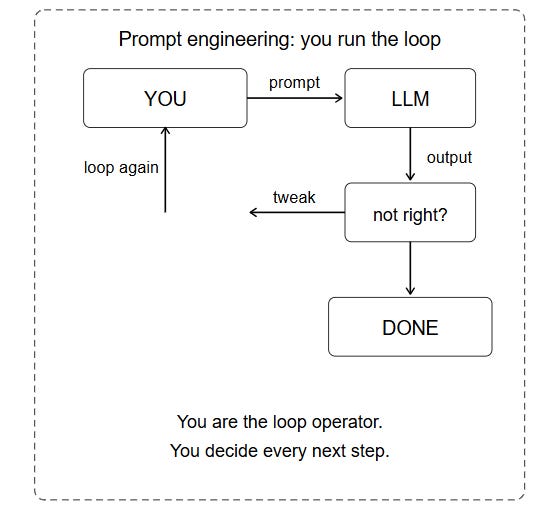
This is the starting point for all of us, and the next level is to replace your input with an agent, which introduces the concept of running loops.
If you read our Ralph Loop Deep Dive guide, it's the same concept.
So,
Loop engineering is building a cycle that an agent runs autonomously, repeating until a stop condition is met.
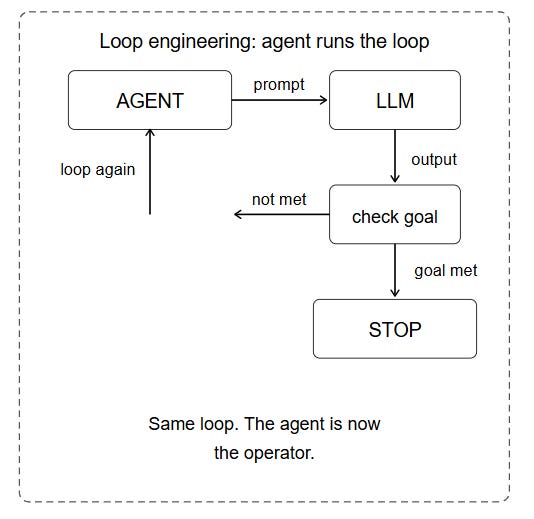
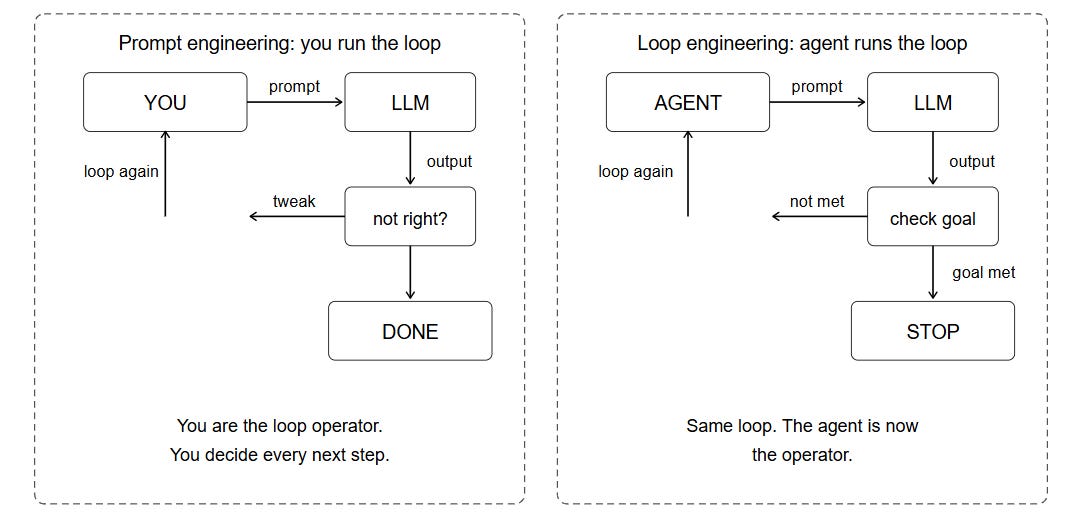
The change here is about who operates the cycle: in prompt engineering, you operate it turn by turn, but in loop engineering, you define the cycle, and the agent operates it.
Prompt Engineering vs Loop Engineering
Every loop goes through different phases.
Four Phases Every Loop Runs Through
Every well-built loop has four phases that apply whether you are fixing a bug, writing a report, or reviewing a PR.
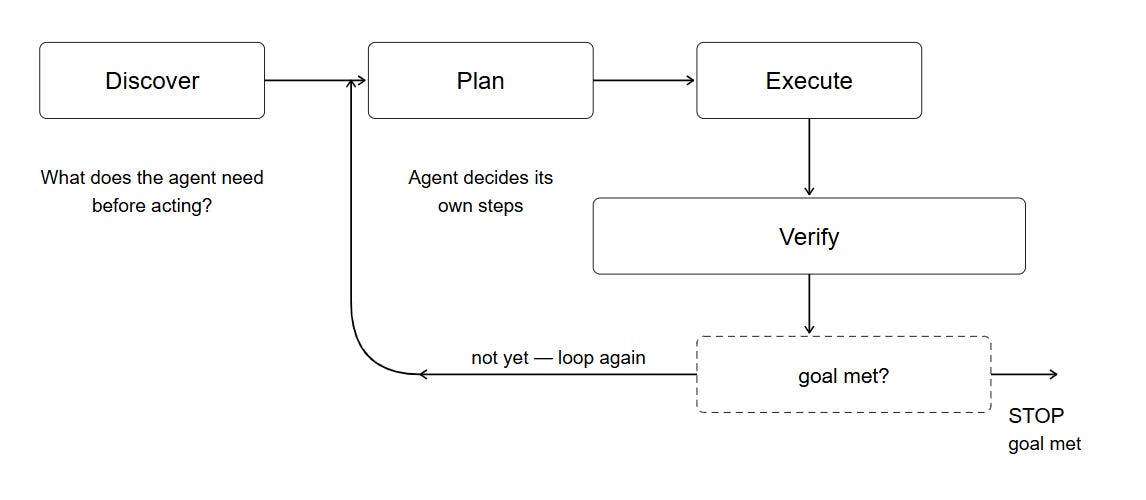
Discover: The agent gathers what it needs before acting. In Claude Code, this means reading files, checking git status, and running a test suite to see the current state.
Plan: The agent decides its own steps. The quality of this plan determines how many iterations the loop needs.
Execute: In Claude Code, this means tool calls, file writes, and bash commands. A well-built loop treats errors as inputs to the next iteration.
Verify: The agent checks whether the goal was met. A weak verifier produces a loop that exits early, claiming success. A strong verifier produces a loop that finishes the job.
So, what makes a good loop?
Three Qualities of a Good Loop
Every loop that works in production has three things, and if you miss one, your loop is likely to fail.
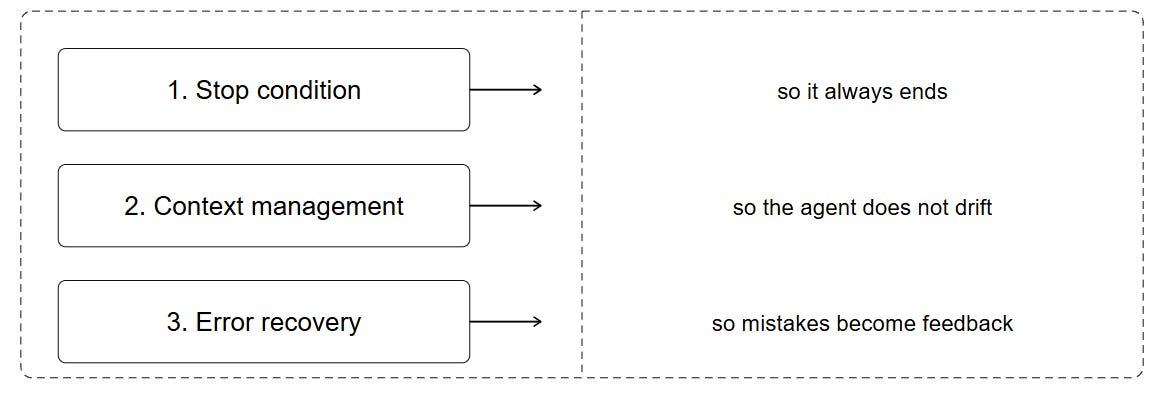
# 1: A Clear Stop Condition
Without a stop condition, the loop runs until your API credits expire or you manually stop it.
A stop condition has two parts:
Success condition: the measurable state that means the job is done.
all tests passing
coverage above 80%
PR checks green
zero lint errors
Safety cap: a maximum turn count that stops the loop no matter the result.
stop after 10 tries
stop after 5 attempts
stop after 15 runs
The safety cap protects you from an agent that is stuck and burns through your Claude Code budget.
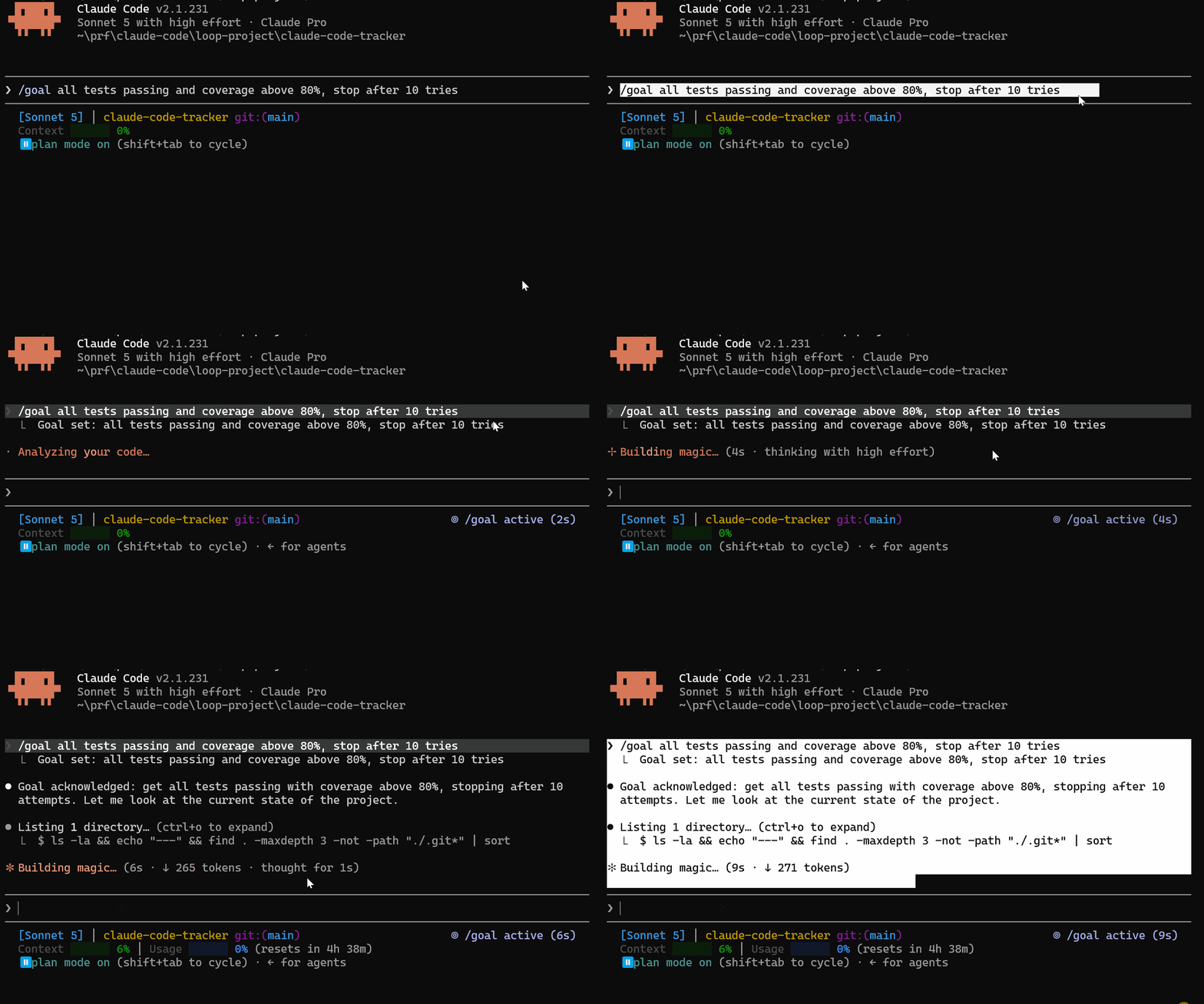
/goal all tests passing and coverage above 80%, stop after 10 tries2: Context Management
After a dozen iterations, the agent’s context window fills with test logs, error messages, old file states, and intermediate reasoning.
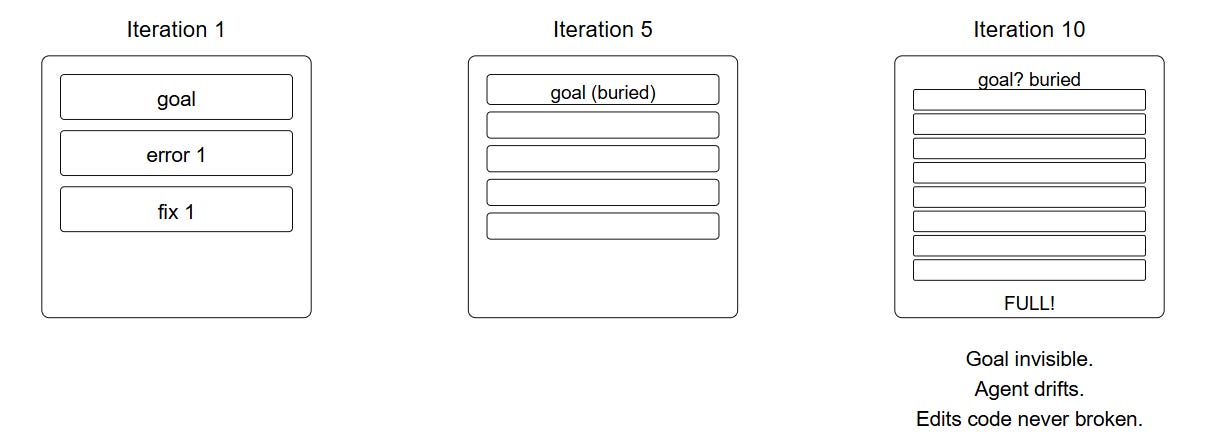
To fix context pollution in Claude Code:
Keep the latest error and the file in question. Everything else from previous iterations should be stripped
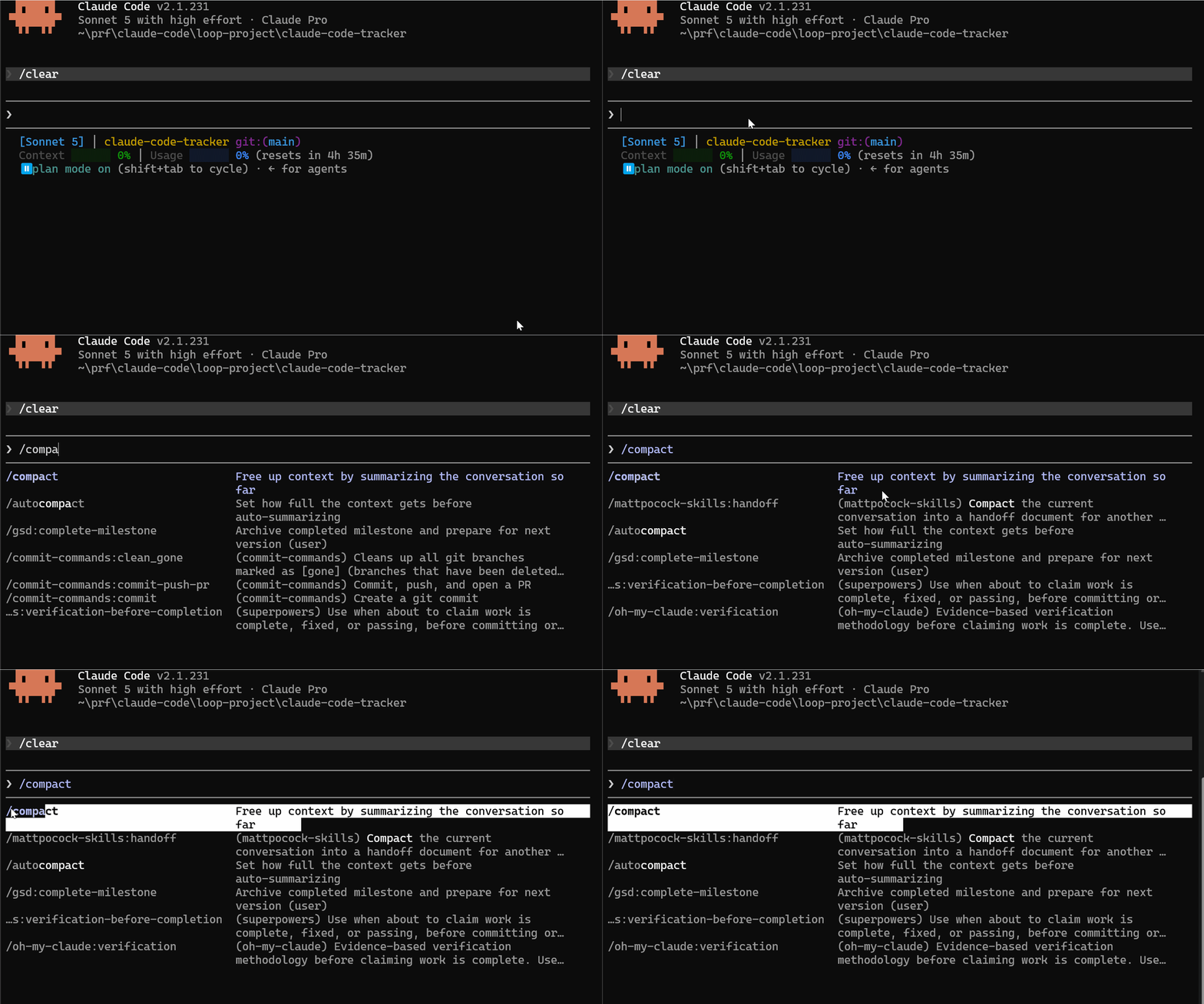
Summarize old steps into a short note. Claude Code’s
/compactcommand does this automatically. It compresses the conversation history into a brief summary and keeps only the essential context for the next iteration.
Remind the agent of the goal on every cycle. Your CLAUDE.md file is the right place for this. Whatever you put in CLAUDE.md is included at the start of every session and every sub-agent context.
You can reference the Claude.MD Masterclass to learn how to use it properly
3: Error Recovery
When the agent runs a command and it fails, something in the loop must decide what to do next.
Without a plan, the agent stops at the first failure and waits for you. That defeats the purpose of the loop.
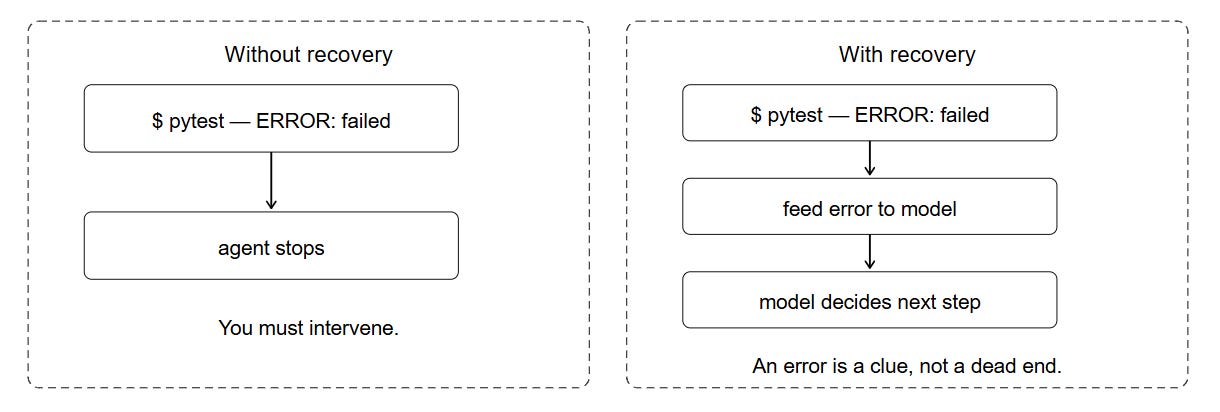
In Claude Code, error recovery is built in. When a bash command fails, Claude reads the error output and uses it to choose the next action.
You do not need to build this yourself, but you do need to know it exists so you can write prompts that expect errors.
The key insight: design your loop assuming commands will fail. Your stop condition should be based on the goal being met, not on commands running without errors.
Three Claude Code Loop Commands
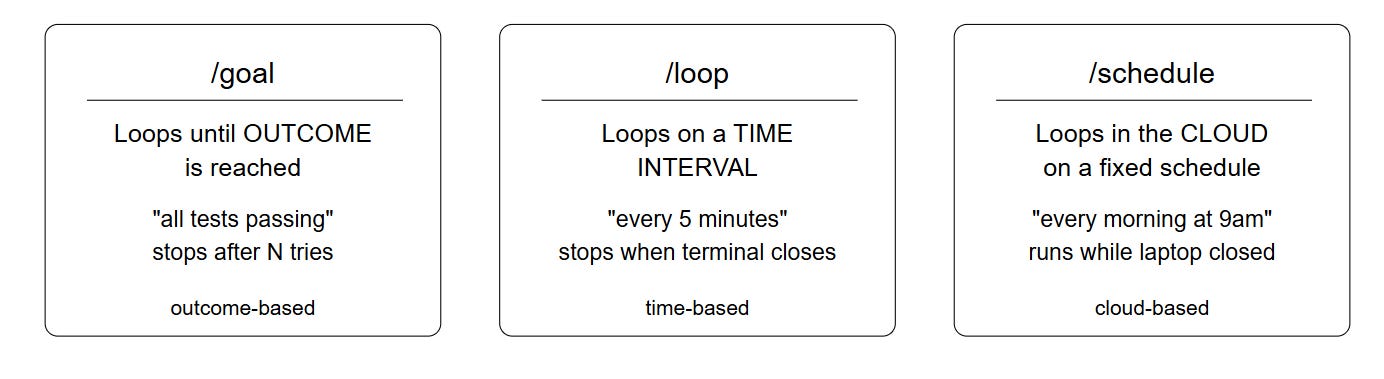
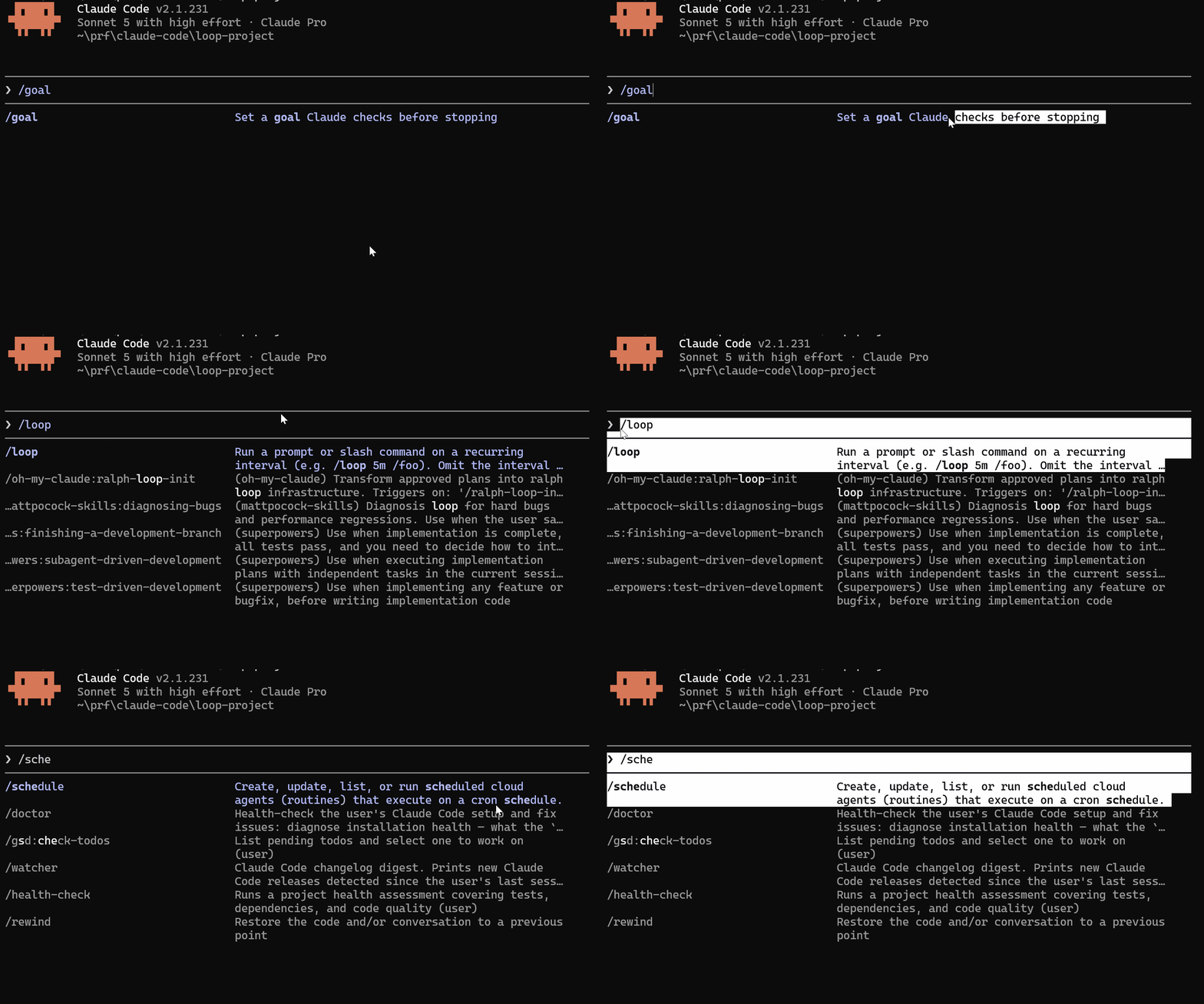
Claude Code has three native loop commands. Each one handles a different trigger and use case.
1) /goal: The Outcome-Based Loop
/goal is what you use when you know what done looks like. You define the success condition and a safety cap, and Claude Code handles the rest.
/goal all tests passing and no type errors, stop after 10 triesAfter you run this, Claude Code:
Runs the test suite
Reads the failures
Fixes the failing code
Runs tests again
Checks whether the goal condition is now true
If yes: exits with a success message
If no: loops again up to the turn cap
An evaluator model checks your goal condition after each iteration. This is a separate model call, not the one used in the session.
Writing a good /goal condition:
Strong conditions are measurable and binary:
/goal all 47 tests passing, stop after 8 tries
/goal coverage above 80% and no lint warnings, stop after 5 tries
/goal PR checks all green and no TODO comments in changed files, stop after 10 tries
Weak conditions produce loops that never exit:
/goal make the code better               ← not measurable
/goal fix the issues you find            ← not binary
/goal improve test coverage              ← no threshold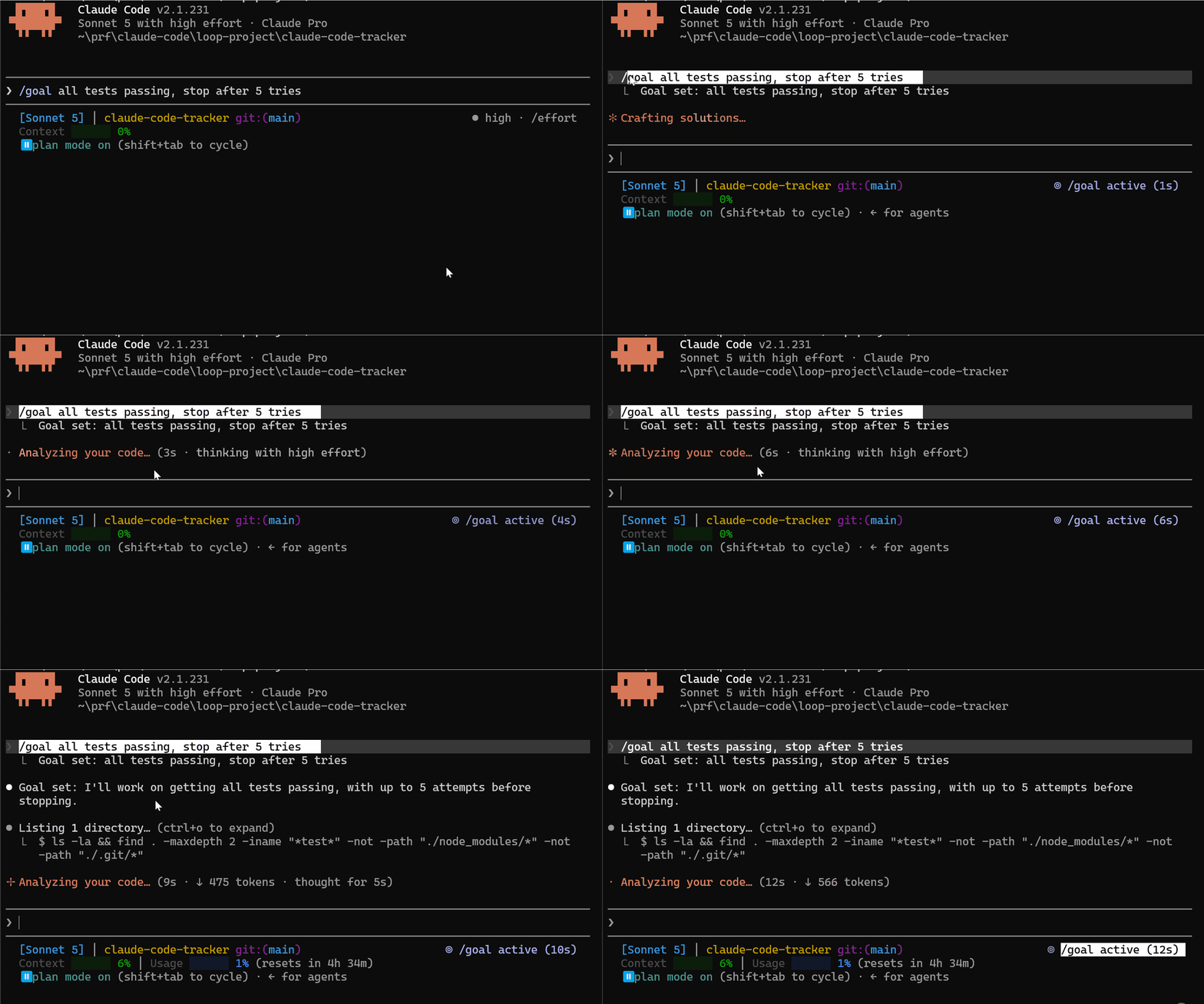
/goal all tests passing, stop after 5 tries2) /loop: The Time-Based Loop
/loop is what you use when the work is recurring and reacts to external events rather than working toward a single goal
/loop 5m check the PR for new review comments and address themThis runs every 5 minutes; Claude checks the PR, reads any new comments since the last check, addresses them, and waits for the next interval.
The difference from /goal: /loop does not have a stop condition. It keeps running until you close the terminal. Use it for tasks that are ongoing
/loop 2m check for failing CI and fix the errors
/loop 10m read #project-feedback and triage new issues
/loop 30m check if any deploys failed and roll them back
/loop 2m check for any failing tests and fix them3) /schedule: The Cloud-Based Loop
/schedule is /loop that keeps running after you close the laptop. It moves the loop to the cloud.
/schedule every morning: check #project-feedback for new bugs and triage themThe difference from /loop:
/loopstops when you close the terminal/schedulekeeps running on Anthropic’s infrastructure
Use
/schedulefor daily digests, nightly CI runs, and any task that needs to happen on a fixed schedule whether you are at your desk or not.
4) Proactive loop: combining /schedule and /goal
The most powerful pattern in Claude Code is combining both commands:
/schedule every hour: check #project-feedback for bug reports
/goal do not stop until every report found this run is triaged,
actioned, and responded to
This creates a fully autonomous loop:
The schedule triggers every hour
The goal runs until every bug report in that batch is handled
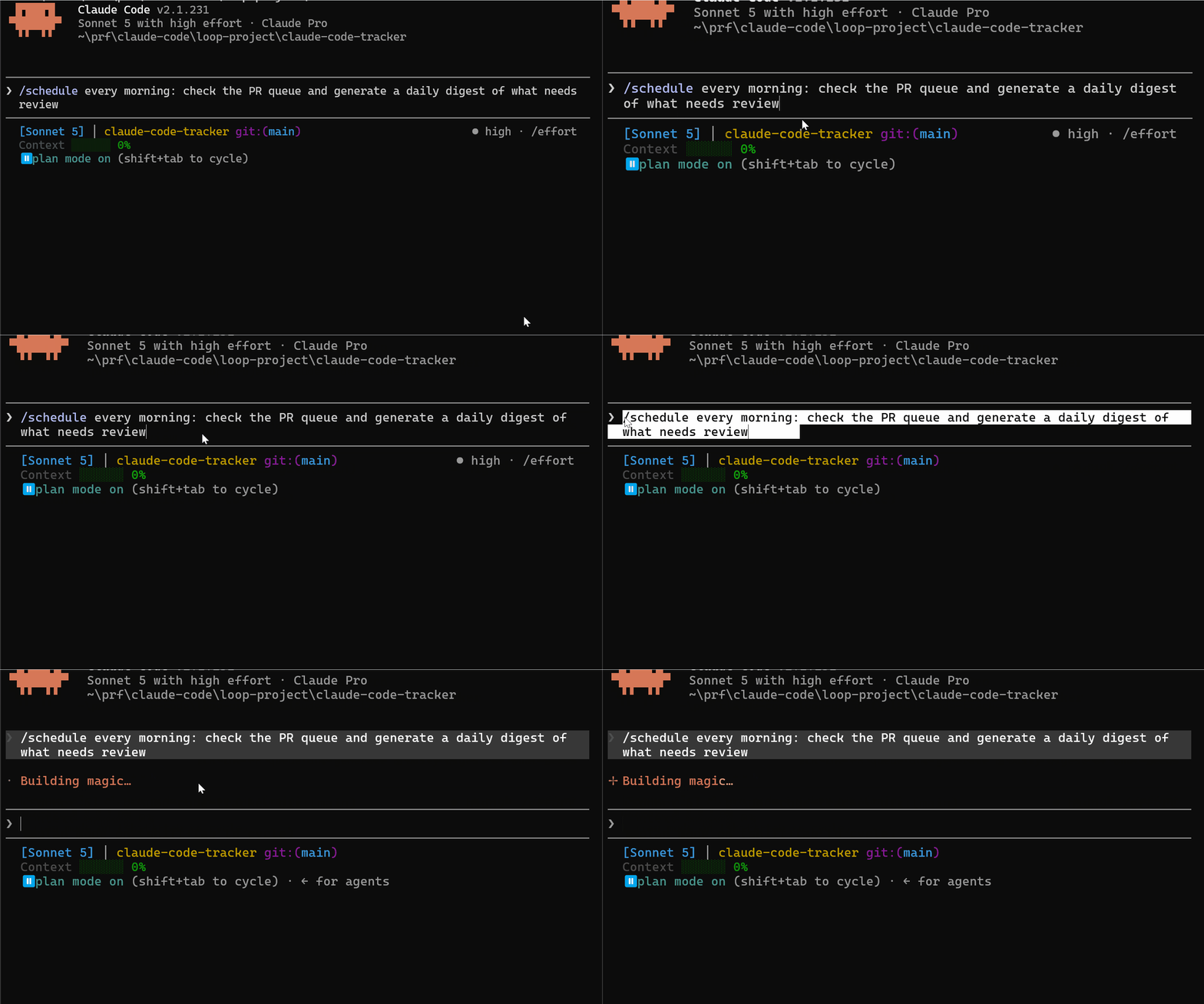
/schedule every morning: check the PR queue and generate a daily digest of what needs reviewReal Loop in Claude Code: PR Readiness Loop
Here is the complete loop engineering example using Claude Code on a real example.
Suppose this is the case:
You have a branch ready to merge, but the CI is failing because three tests are broken, coverage has dropped below 80%, and there are two lint errors.
Normally, you would fix these manually, turn by turn. Loop engineering lets the agent handle the entire cycle.
Step 1: Design the Loop
Before you start designing the loop, you need to answer these four questions:
What does done look like? All tests passing, coverage above 80%, zero lint errors.
What is the safety cap? 10 iterations maximum. After that, something structural is wrong, and you need to look.
What context management does the agent need? The CLAUDE.md in this project already documents the test command and the coverage threshold. The agent will not drift if it keeps re-reading CLAUDE.md at the start of each iteration.
What errors should the agent recover from vs stop on? Recover from: test failures, lint errors, coverage gaps. These are the job. Stop on: syntax errors that prevent the test suite from running at all. That requires human eyes.
Step 2: Run the Loop
/goal all tests passing, coverage above 80%, no lint errors, stop after 10 tries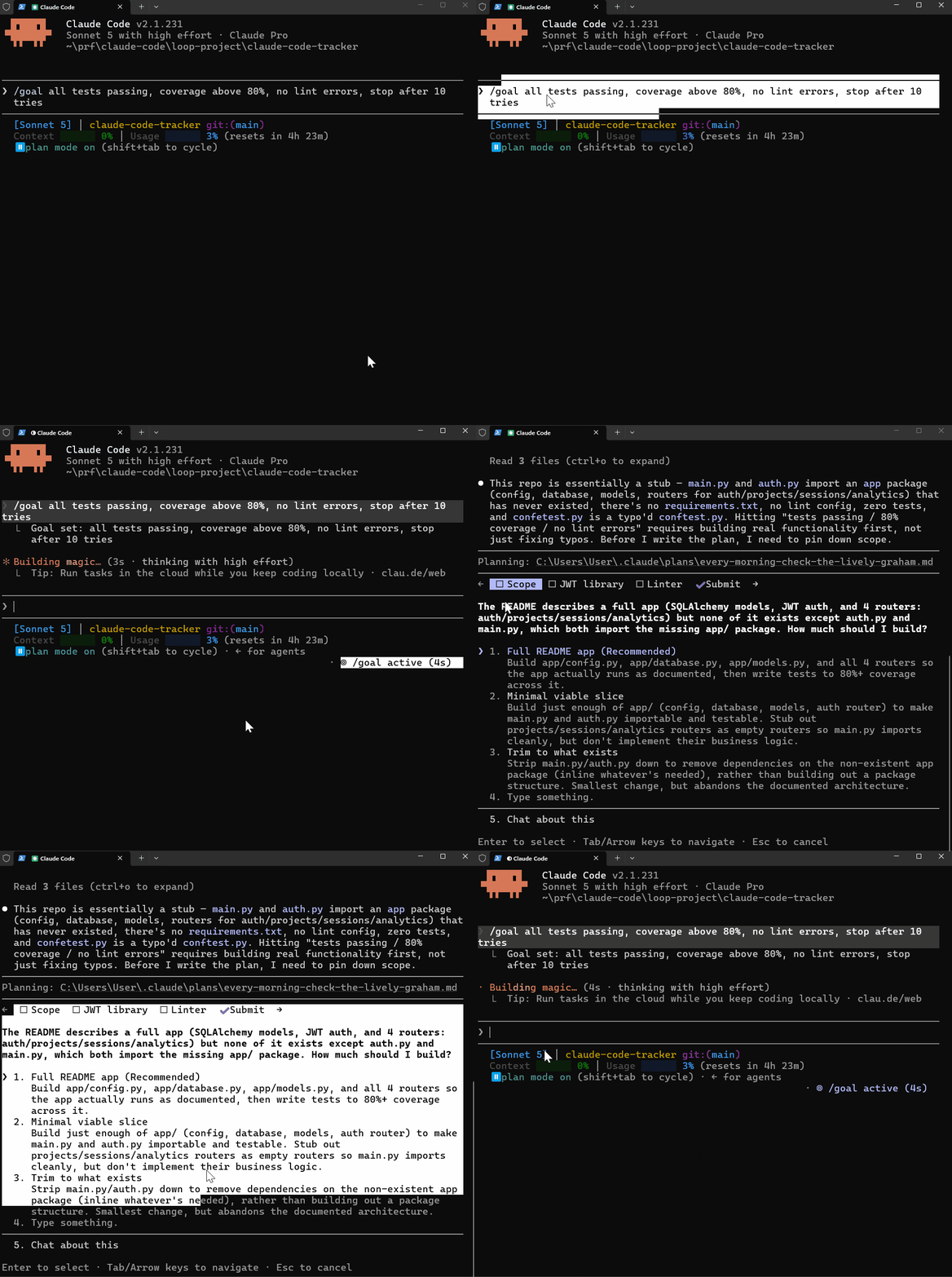
Iteration 1:
- Runs: pytest --cov=app tests/
- Reads: 3 failures, coverage 71%, 2 lint errors
- Plans: fix the three failing tests first
- Writes: updated test fixtures
- Re-runs: pytest
- Evaluates: still failing, loops again

Iteration 2:
- Runs: pytest
- Reads: 1 failure remaining, coverage 74%
- Plans: fix the remaining test
- Writes: fixes the edge case in auth validation
- Re-runs: pytest
- Evaluates: all passing now, checks coverage

Iteration 3:
- Runs: pytest --cov=app
- Reads: all passing, coverage 76%, 2 lint warnings still
- Plans: fix lint errors
- Writes: reformats two functions
- Re-runs: pylint
- Evaluates: zero warnings, coverage 77%, not above 80% yet

Iteration 4:
- Adds missing test cases to reach 80%
- Re-runs full suite
- Evaluates: all conditions met
- EXITS: goal reached in 4 iterations
Step 3: Find the Loop Limitations
The PR readiness loop works because one agent does one thing (fix the PR), but it cannot :
Review its own fixes independently—The agent that wrote the test fix is the same agent that evaluates whether the fix is correct. It cannot be a credible skeptic of its own work.
Parallelize— If there are five categories of issues (tests, coverage, lint, types, security), the loop handles them one category at a time. They cannot run simultaneously.
Visualize the flow— If you read the transcript, you see 47 tool calls in sequence. You cannot quickly tell which iteration caught the coverage gap or which fix introduced a new issue.
These three limitations can be fixed by one solution that we will build next.
In the next Masterclass issue, we’ll cover Graph Engineering in Claude Code, which is Part II of this masterclass issue (Due for release next week)
Thanks for the support: reach me anytime (community, email, or Substack DM). Premium issues, tutorials, and course modules unlock in the membership area as they are released. Masterclass Pro is live — join us today.
Let’s keep this going.
Resources
For this issue, these are the resources available:
Tested Loop Templates Prompt (Members Resource Library)
Other: Coming Up Issues
The next issues in this Masterclass Series will cover:
Claude Code Subagents Masterclass — Building your AI team
Claude Code MCP Masterclass — Extending Claude’s capabilities
How are You Using Loops in Claude Code?
Let me know your thoughts, tips, and any questions in the comments below.
Finally, this newsletter belongs to all of us. If there’s something that can make it better or something you don’t like, please let me know.
See you in the next one.
Claude Code Masterclass
Let’s Build It Together
— Joe Njenga
Oh, Joe, thank you, your article is very helpful for me. very helpful. ...
great read! absolutely great point on the stop conditions. loops get expensive fast hah.